
Welcome to today’s detailed guide on the Mintly Task App, one of the newly launched earning platforms in Pakistan. I will explain how to withdraw your earnings from the Mintly App. A few days ago, I introduced the Mintly App, which is a task-to-earn project. Here, you complete small tasks and earn passive income without any investment. You also don’t need to build a team, just complete tasks and earn money. Now let’s discuss the most critical part about joining, working, and withdrawing.
 Join WhatsApp Channel
Mintly App Joining Guide
- Click On the Join Mintly Button For the Joining Link
- Create an account when the registration form opens.
- Enter Your Email Address, Your Password, and Referral Code
- Press the Register Button to see the account. You will see Account Registration Successful.
- After Successful Account Registration, Download the APK File and Install
Mintly Task Rewards Explained
1. Registration Reward
When you create a new account through my referral link, you will receive a 50 PKR Registration Bonus.
2. Referral Income
If your team members join through your referral link and complete the task, you will get referral income daily.
3. WhatsApp Task Reward
When you link your WhatsApp number with the Mintly app, you will earn up to 3000 by completing WhatsApp tasks.
Mintly Withdrawal Process
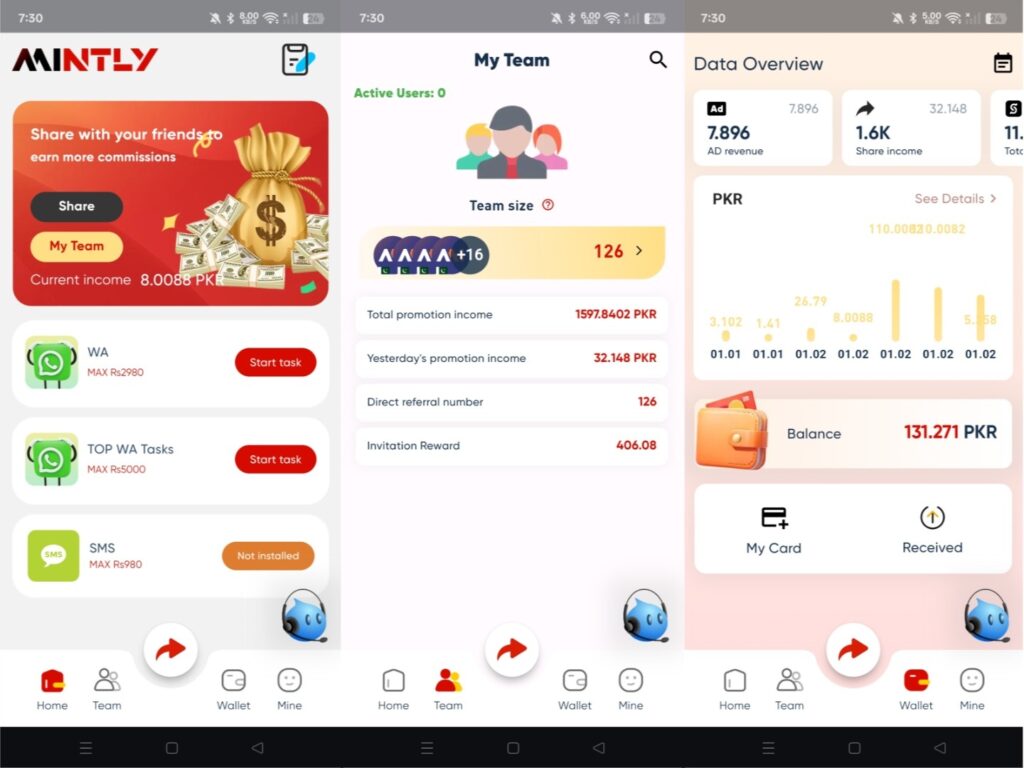
Step 1: Open the Mintly app and go to the “Wallet” section. Here, you must check whether your balance is at least 110, because the minimum withdrawal amount is 110. For example, the Withdrawal amount is 100. For this withdrawal, you must pay a 10 PKR fee. So, for a withdrawal, you must have 110 PKR to complete it. If your balance meets this requirement, you can proceed.
Step 2: Set Your Trading Password. Before you request a withdrawal, you must set a 6-digit Trading Password. You can choose any password you like, such as 112233, or a secure one. This password will be required every time you make a withdrawal.
Step 3: Add your Easypaisa or JazzCash Wallet Details to receive your withdrawal into your account. You will need to enter Your Name, Bank or Wallet Name, Account Number / Wallet Number, and Telephone Number. Once your payment details are saved, you are ready for withdrawal.
Step 4: Start the Withdrawal Process Now. Go to the Wallet tab in the app. Tap on “Wallet”, Tap on “Receive”. You will now see your available balance. For example, if you have 3000, you can withdraw it.
Step 5: You will receive a withdrawal within 2 to 3 hours of submitting a withdrawal request. As soon as Mintly approves your request, the payment will be transferred to your linked Easypaisa or JazzCash Wallet.
Final Words
This is the complete process to withdraw money from the Mintly App. I regularly share helpful guides that can help you earn passive income from home.


Maybe Kam Karna chata hin
ap join kar lo details video upload ki ha channel py