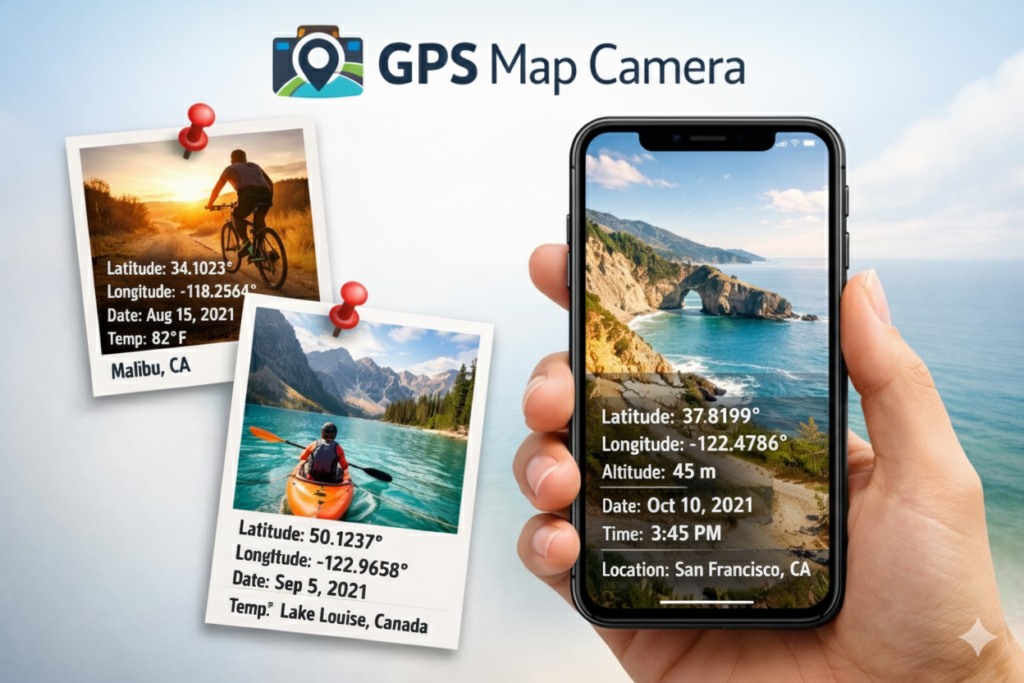
GPS Map Camera is an Android app that automatically adds location, map, date, time, address, and other information to a photo when you take it. This app is handy for site visits, fieldwork, travel, blogging, and documentary photography. Nowadays, mobile phone cameras are no longer just about taking beautiful pictures; they also need to capture photos with real-time location and details.
 Join WhatsApp Channel
Key Features Of GPS Map Camera
GPS Map Camera is an Android app that enhances your photography with geotagging and detailed stamping. This means that each photo is automatically tagged with location (GPS Coordinates), map, date, time, weather, etc.
1. GPS Location & Map Stamp
When You Click a Picture With the GPS Camera App, every photo automatically adds GPS coordinates like Latitude & Longitude, Date and time, and a small map picture, so you can know where the photo was taken.
2. Custom Notes & Logos
You can also add your name, project notes, company logo, or hashtags to each photo.
GPS Map Camera. It is possible to view the map in different styles (Normal, Satellite, Hybrid, etc.).
3. Full Address Details
The capture photo shows the complete address information, including area, city, and country.
4. Multiple Map Styles
You can choose from different map views, such as Normal, Satellite, or Hybrid, to match their needs.
Read Also: How to Use the GPS Map Camera App on Android Full Guide
Benefits of using the app
1. Professional Use
This app is handy for people who need to conduct site visits, field reports, property inspections, or documentation, because each photo saves the location and date.
2. Travel and Blogging
Photos taken during a trip are no longer just photos; they are also the place and time of each moment, which is very valuable for bloggers and travelers.
3. Save Good Memories
More than just visual information, each photo becomes a complete, memorable moment.
4. Protect Your Privacy
This App also protects your privacy. Whenever you use apps that access GPS and location data, keep privacy and security in mind. Some users say that sharing location data can sometimes expose personal information.
How To Use the GPS Camera APP
Step 1: To use this app, first download and install it using the link below. When you click it, the Google Play Store opens, and you see the GPS Map Camera. Install the app from the Play Store. Once the app is downloaded, open it 100% and grant it the necessary permissions.
Step 2: The GPS Camera app requires specific permissions on your phone to work correctly. When you first open the GPS camera app, you should allow access to Location, Camera, Storage, or Gallery. Allow all permissions for this app; otherwise, it will not work correctly.
Step 3: After giving the required permission, Set App Settings. Open Settings and set your Location Settings, then turn on GPS and set Location Mode to High Accuracy. Select a map style: Normal, Satellite, or Hybrid. Set Date and time Format (Example: DD/MM/YYYY)
Step 4: Take a photo with the GPS Map Camera. Click the Camera button on the app. You will see the location, map, and date on the screen. Set the photo in the frame, and press the Capture button. The image will be automatically saved in your photo gallery with all the details.
Step 5: You can check or view captured images in your phone’s gallery or the folder location you set in the app. Open the Photo Gallery app. All the geotagged images will be there. You can also share, delete, or edit the photos.
Conclusion
GPS Map Camera is a great app that turns your ordinary photos into evidence, memories, and professional records. If you want each image saved with its original location and time, this app is a must-have. If you want to save your photos with more than just memories, with complete information, geotags, and professional stamps, then GPS Map Camera is a great choice. Whether you are a professional or a travel enthusiast, this app will provide you with valuable data, including real location and time, in every photo.