I will tell you in simple words about the complete method of how to check filer status through the FBR IRIS portal, what the difference is between a filer and a non-filer, and what the benefits of becoming a filer are.
 Join WhatsApp Channel
The most-asked question in Pakistan is how to check my FBR status, especially when people buy property, send money, buy a new car, or buy any vehicle. The Federal Board of Revenue (FBR) has introduced the IRIS Portal for the easy status check of your active and inactive status of the citizens of all Pakistan, through which you can not only check your FBR filer status, but you can also register as a new filer or even activate your inactive filer by filling your return challan online.
What is Filer Status?
Filer status refers to whether you have filed your income tax return on time or not.
- A person who files a tax return on time is called an Active Filer.
- A person who does not file a tax return is called an In-Active Filer.
- A Person who did not register himself as a filer is called a Non-Filer.
Why is it essential to check filer status?
Checking the filer status is essential because:
- The filer has to pay less tax.
- An active filer facilitates lower tax on bank transactions.
- Less withholding tax while buying a vehicle or property.
- Business reputation improves
- Government and private institutions ask for filer status.
What is the FBR IRIS Portal?
IRIS is actually the online tax management system of FBR, where citizens can check all their tax-related matters, such as:
- Income tax registration
- Obtaining NTN
- Filing tax returns
- Updating tax profile
- Checking filer status
How to check filer status through the FBR IRIS Portal
There are two easy ways to check filer status through the IRIS Portal. Below, we explain the first and most used method in detail.
Check Filer Status through FBR IRIS Portal
Step 1: Open Chrome or any browser, Type in the search bar: FBR IRIS Portal, and open the official FBR website.
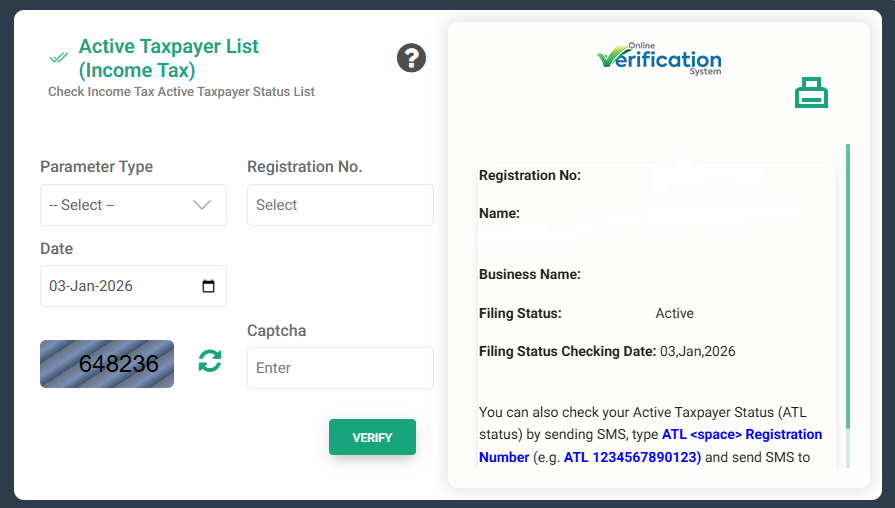
Step 2: Go to the Online Verification Portal. After the website opens, click on Active Taxpayer List (Income Tax)
Step 3: Select Parameter Type. Here, select CNIC (for individuals), Registration Number. Enter your CNIC number without dashes. Date will be automatically selected. Captcha Code: Enter the code given on the screen. After entering all the information correctly, click on the Verify button.
Step 4: Check Filer Status. After verification, the following information will appear. Your full Name, CNIC / NTN Number, Business Description (if registered), Filing Status (Active / Inactive / Late Filer), and Status Check Date. If ‘Active’ is written, you are a filer. If you are an Inactive or Late Filer, then you are not currently included in the filer list.
Difference between Filer and Registration Status
Most people consider Registration Status to be a filer, but that is incorrect.
- Registration Status
It indicates whether you are registered with the FBR.
- Filer Status
It indicates whether you have filed a tax return.
Both things are different.
How to activate Filer Status?
If you are a non-filer, to become a filer:
- Log in to the IRIS portal.
- File Income Tax Return for the relevant tax year
- After the return is submitted
- Your name will be included in ATL in a few days.
Common issues and their solutions
Problem: Name is not appearing in ATL
Solution:
- Check that the return has been submitted correctly.
- Wait for the next ATL update.
Problem: Late Filer is being written
Solution:
- File the return before the due date.
Conclusion
Checking the filer status through the FBR IRIS portal is very easy and free. If you file your tax return on time, not only do you become a filer, but you also get financial and legal benefits. This complete guide will help you, and now you can easily check your filer status.